In this notebook we will perform a comparative analysis between various sentiment analysis approaches.
Introduction
For this project we will perform a comparative analysis between various sentiment analysis approaches. The scope of this study is to compare out-of-the-box performance of various classifiers in order to establish some classifier baselines for future studies. To perform the comparison we will run various algorithms on a drug reviews data set and compute several metrics per classifier.
More specifically, we will compare the following approaches towards semntiment analysis:
Rule-based sentiment analysis: For this approach we will compare two rule- and lexicon-based sentiment classifiers, i.e. VADER and Textblob
Feature-base sentiment analysis: For this approach we will convert the reviews into features using TF-IDF scores and then train a standard ML classifier to peform sentiment analysis. Classifiers we will use are Naive Bayes, Logistic Regression and Support Vector Machines (SVMs)
Embedding-based sentiment analysis: For this approach we will embed the review words using a pretrained language model and then use a transformer to perform sentiment analysis. The language model we will use or this analysis is DistilBERT model that was fine-tuned for sentiment analysis.
As evaluation metrics we will use Precision, Recall, f1-score, AUC and Jaccard Index, which we will compute for each classifier using the test data set.
[nltk_data] Downloading package punkt to /home/ubuntu/nltk_data...
[nltk_data]   Package punkt is already up-to-date!
Data Import
We will start our analysis by importing the drug reviews from json files.
code
def load_reviews(stage, file):# Loading data from multi-line jsonl files, so set 'lines=True' df = pd.read_json(file, lines=True).convert_dtypes() df = df.astype({col: 'int32'for col in df.select_dtypes('int64').columns}) df['drugName'] = df['drugName'].astype('category') df['condition'] = df['condition'].astype('category') df['condition'] = df['condition'].str.replace('disorde', 'disorder') # Correct type in data set df.rename(columns={'usefulCount': 'useful_count', 'drugName': 'drug_name'}, inplace=True) df.set_index('patient_id',inplace=True) df.drop_duplicates(inplace=True, subset=['review'])print(f'Number of unique reviews in {stage} set:', df.shape[0])return(df)
Number of unique reviews in training set: 84138
Number of unique reviews in validation set: 26054
Number of unique reviews in test set: 41467

151659 unique drug reviews imported
Let’s quickly check that the data does not contain any NA values.
code
ifsum([df.isna().sum()[1] for df in [train_df, val_df, test_df]])==0:print("No missing values found!")
No missing values found!
Label creation
We will first preprocess our data and put it in a tidy format for subsequent analyses. To create training labels we will use the rating provided by the reviewer themselves. We will assign label POSITIVE to ratings greater or equal to 7 and NEGATIVE to ratings smaller than 7.
code
# Unicode strings for emoticonsHAPPY ="\U0001F642"SAD ="\U0001F621"STAR ="\U00002B50"def preprocess_df(df): cols = ["drug_name","condition","review","stars","rating","actual_sentiment","actual_label","date","useful_count","review_length", ] df["actual_label"] = ["POSITIVE"if x >=7else"NEGATIVE"for x in df['rating'].tolist()] df["actual_label"] = df["actual_label"].astype("category") sentiment_labels = ["NEGATIVE", "POSITIVE"] df["actual_label"] = df["actual_label"].cat.reorder_categories(sentiment_labels) df["actual_sentiment"] = [HAPPY if x >=7else SAD for x in df['rating'].tolist()] df["stars"] = [STAR * x for x in df["rating"].tolist()] df = df[cols]return dftrain_df = preprocess_df(train_df)val_df = preprocess_df(val_df)test_df = preprocess_df(test_df)
code
test_df = test_df.head(1000)
After preprocessing we now have a column “actual_label”, which is a binary variable that contains the sentiment labels, i.e “POSITIVE” or “NEGATIVE”. We will use this column during training to train some of the classifier models and we will also use these labels during validation and testing to assess classifier performance.
To provided a quick, visual overview, we have also added some emoticons for the sentiment labels and ratings. So, after preprocessing our data table looks as follows:
code
train_df.head(5)
drug_name
condition
review
stars
rating
actual_sentiment
actual_label
date
useful_count
review_length
patient_id
89879
Cyclosporine
keratoconjunctivitis sicca
"i have used restasis for about a year now and...
⭐⭐
2
😡
NEGATIVE
2013-04-20
69
147
143975
Etonogestrel
birth control
"my experience has been somewhat mixed. i have...
⭐⭐⭐⭐⭐⭐⭐
7
🙂
POSITIVE
2016-08-07
4
136
106473
Implanon
birth control
"this is my second implanon would not recommen...
⭐
1
😡
NEGATIVE
2016-05-11
6
140
184526
Hydroxyzine
anxiety
"i recommend taking as prescribed, and the bot...
⭐⭐⭐⭐⭐⭐⭐⭐⭐⭐
10
🙂
POSITIVE
2012-03-19
124
104
91587
Dalfampridine
multiple sclerosis
"i have been on ampyra for 5 days and have bee...
⭐⭐⭐⭐⭐⭐⭐⭐⭐
9
🙂
POSITIVE
2010-08-01
101
74
Create training, validation and test sets
To facilitate model building and evaluation, we will extract features and labels for the train, validation and test sets.
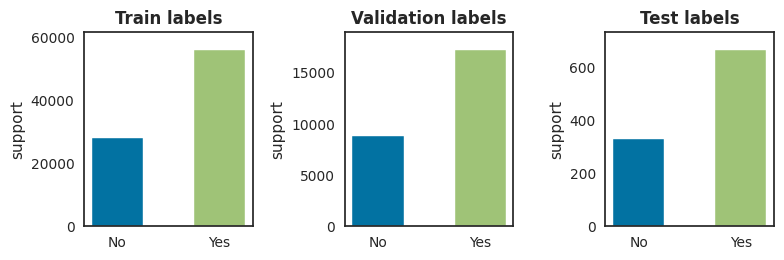
Now that we have created labels for the training, validation and test set, we can immediately have a look at the class proportions to see whether the data set is balanced with regards to the classes.
Rule-based approaches to perform sentiment analysis typically rely traditional NLP techniques such as parsing, stemming, tokenization, part-of-speech tagging and lexical analysis to perform sentiment analysis.
Two well-known programs to perform rule-based sentiment analysis are VADER[Hutto & Gilbert, 2014] and Textblob[Loria, 2018], which we will further present and evaluate in the next two paragraphs.
Because those rule-based sentiment analysis algorithms typically do not need to get trained first on a training data set, we will run both VADER and Textblob immediately on the drug reviews in the test set.
Vader
VADER (Valence Aware Dictionary and sEntiment Reasoner) is a lexicon and rule-based sentiment analysis tool that is specifically attuned to sentiments expressed in social media.
After running VADER on the test data set, we will get a list with polarity scores and sentiments for all drug reviews in the test set. We will store those results in a dataframe, which will be used for further analysis later.
code
analyzer = SentimentIntensityAnalyzer()vs_result_list = []for sentence in tqdm(test_df['review'].tolist()): vs = analyzer.polarity_scores(sentence) vs_result_list.append(vs)
vs_dict = defaultdict(list)for vs in vs_result_list: label ="POSITIVE"if vs["compound"] >0else"NEGATIVE" vs_dict["vader_neg"].append(vs["neg"]) vs_dict["vader_neu"].append(vs["neu"]) vs_dict["vader_pos"].append(vs["pos"]) vs_dict["vader_polarity"].append(vs["compound"]) vs_dict["vader_label"].append(label) emoji = HAPPY if vs["compound"] >=0else SAD vs_dict["vader_sentiment"].append(emoji)vader_df = pd.DataFrame(vs_dict, index=test_df.index)vader_df.head()
vader_neg
vader_neu
vader_pos
vader_polarity
vader_label
vader_sentiment
patient_id
163740
0.204
0.629
0.167
-0.5267
NEGATIVE
😡
206473
0.040
0.802
0.158
0.7539
POSITIVE
🙂
39293
0.036
0.884
0.080
0.6810
POSITIVE
🙂
97768
0.036
0.825
0.139
0.9559
POSITIVE
🙂
208087
0.065
0.802
0.133
0.6924
POSITIVE
🙂
Textblob
TextBlob is a Python (2 and 3) library for processing textual data. It provides a simple API for diving into common natural language processing (NLP) tasks such as part-of-speech tagging, noun phrase extraction, sentiment analysis, classification, translation, and more.
(taken from [https://textblob.readthedocs.io/en/dev/])
Although Textblob is a general NLP library, it also provides functionality to perform sentiment analysis and to compute polarity scores form text. Similar to VADER we will also run the TextBlob sentiment analysis algorithm to compute polarity scores for all drug reviews in the test set, which we will store in a dataframe as well.
tb_dict = defaultdict(list)for tb in textblob_scores: label ="POSITIVE"if tb >=0else"NEGATIVE" tb_dict["textblob_polarity"].append(tb) tb_dict["textblob_label"].append(label) emoji = HAPPY if tb >=0else SAD tb_dict["textblob_sentiment"].append(emoji)textblob_df = pd.DataFrame(tb_dict, index=test_df.index)textblob_df.head()
textblob_polarity
textblob_label
textblob_sentiment
patient_id
163740
0.000000
POSITIVE
🙂
206473
0.566667
POSITIVE
🙂
39293
0.139063
POSITIVE
🙂
97768
0.234537
POSITIVE
🙂
208087
0.341667
POSITIVE
🙂
Interlude: Vader vs. Textblob, a polarity comparison
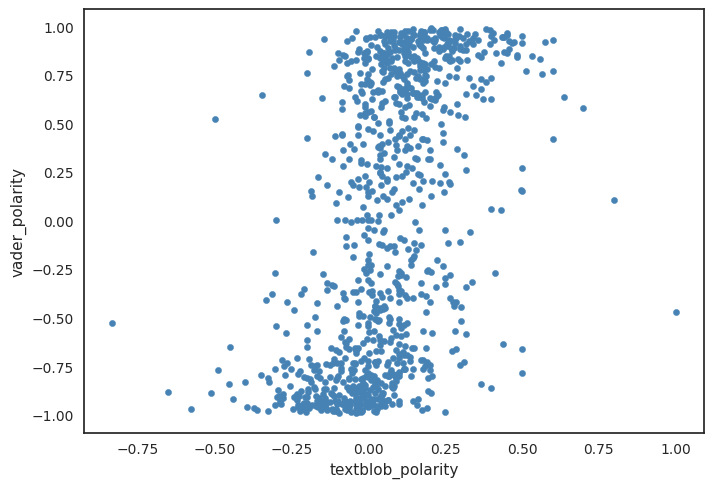
As a small interlude, let’s have a look how the polarity scores from VADER and Textblob compare to each other. First we will take the VADER and Textblob vectors with polarity scores and we will compute the Pearson correlation coeficient between both vectors.
The Pearson correlation percent is 0.5, indicating no statistical relationship between both variables. Let’s also visualize the polarity scores for both classifiers and how they relate to each other. From the graph we can observe that the VADER polarity scores seem to be more negative, whereas the Textblob scores have a more positive polarity.
Besides rule-based sentiment analysis, we can also perform feature-based sentiment analysis. To perform feature-based sentiment analysis we will transform the text of the drug reviews into a numerical representation. We can then use this numerical representation as a feature vector and train some classifiers to learn to predict some sentiment labels.
To convert the drug reviews into numerical vectors we will use term frequency–inverse document frequency (TF-IDF) scores. For the sentiment classification task, we will use some well-known classifiers such as Naive Bayes, Logistic Regression and Support Vector Machins (SVM).
So let’s get started with the feature extraction and compute the TF-IDF scores.
Feature extraction (TF-IDF)
The TF-IDF score for a word \(i\) in a document \(j\) can be computed as follows:
\(TF-IDF = tf_(i,j) \times log(\frac{N}{df_i})\)
Where
\(tf_(i,j)\) = number of occurences of \(i\) in document \(j\)
\(df_i\) = number of documents containing \(i\)
\(N\) = total number of documents
Although we could use a simple bag-of-word model or term frequences, we will use TF-IDF as it conveys some information about the importance of a word in a corpus (and hence it’s feature importance).
To compute the TD-IDF scores, we will use Scikit-learn’s TdidfVectorizer.
Now that we have compute TT-ID scores we can train the different classifier models using the TF-IDF scores from the traing set and the associated labels we have created earlier.
Before training the selected classifiers, we will define some auxiliary functions that will compute and visualize model performance.
code
def fit_model(model, prefix): model.fit(X_train_tfidf, y_train) pred = model.predict(X_test_tfidf) sentiment = [HAPPY if x=="POSITIVE"else SAD for x in pred] df = pd.DataFrame( {f"{prefix}_label": pred, f"{prefix}_sentiment": sentiment}, index=test_df.index )return df
code
y_train_bin = np.array([1if x=="POSITIVE"else0for x in y_train])y_test_bin = np.array([1if x=="POSITIVE"else0for x in y_test])def plot_performance(model): fig = plt.figure(figsize=(14, 14)) fig, axes = plt.subplots(2, 2) cl = ["NEGATIVE", "POSITIVE"] visualgrid = [ ClassPredictionError(model, classes=cl, ax=axes[0][0]), ConfusionMatrix(model, classes=cl, ax=axes[0][1]), ClassificationReport(model, classes=cl, ax=axes[1][0]), ROCAUC(model, classes=cl, ax=axes[1][1], binary=True), ]for viz in visualgrid: viz.fit(X_train_tfidf, y_train_bin) viz.score(X_test_tfidf, y_test_bin) viz.finalize() plt.tight_layout() plt.show()
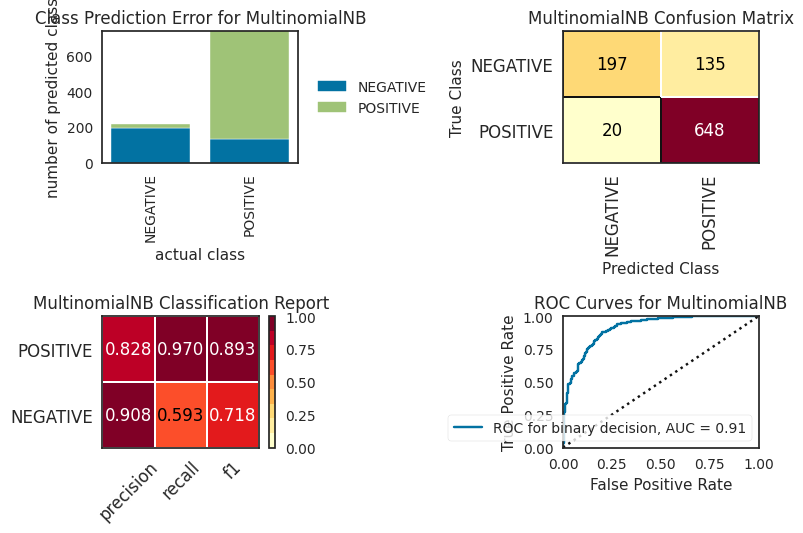
Naive Bayes Classifier
As a first classifier, we will train a Naive Bayes Classifier. Note that we set some weighted class prioers because the class labels are unbalanced.
As a final machine learning model, we will fit a SVM classifier. Because SVMs do not scale well with the number of training examples (i.e they have quadratic runtime complexity) we will only train the SVM on the first 10000 drug reviews. So we will train the SVM with a custom pipeline.
svm_pred = svm_clf.predict(test_df["review"])svm_sentiment = [HAPPY if x =="POSITIVE"else SAD for x in svm_pred]svm_df = pd.DataFrame( {"svm_label": svm_pred, "svm_sentiment": svm_sentiment}, index=test_df.index)svm_df.head(10)
svm_label
svm_sentiment
patient_id
163740
POSITIVE
🙂
206473
POSITIVE
🙂
39293
POSITIVE
🙂
97768
POSITIVE
🙂
208087
POSITIVE
🙂
215892
NEGATIVE
😡
169852
POSITIVE
🙂
23295
POSITIVE
🙂
71428
NEGATIVE
😡
196802
NEGATIVE
😡
Embedding-based sentiment analysis
Another approach to perform sentiment analysis is to use word embeddings. We can embed the words in the drug reviews using pretrained language models and then train a transformer model to predict the sentiment labels from the word embeddings. Compared to the previous TF-IDF + classifier approach, we will not only have more context from the language model embeddings, but we will also have more sentence context because BERT models are bidirectional. So possibly this emmbeding approach could improve sentiment predictions compared to previous approach.
To create the word embeddings we will use the Flair NLP library, which will download the pretrained language model and subsequently will create the embeddings and transformer model. Flair uses sentiment-en-mix-distillbert_4 as a pretrained language model. This language model is based on the distilbert language model and was further fine-tuned for performing sentiment analysis.
Now that we have run all our models, we are finally ready to compare and evaluate model performance of the various classifiers.
Merge results
We already have all those model scores computed on the test for all classifiers, so let’s put everything together in one data frame to facilitate further comparisons.
We will also add additional columns with binary labels, as it will make it easier to score the model predictions later on.
code
label_cols = results_df.filter(regex=("_label")).columns.to_list()for l in label_cols: new = l.replace('label', 'binlabel') results_df[new] = [1if x =="POSITIVE"else0for x in results_df[l] ]results_df.filter(regex=("_binlabel")).head()
actual_binlabel
vader_binlabel
textblob_binlabel
lr_binlabel
nb_binlabel
fl_binlabel
svm_binlabel
patient_id
163740
1
0
1
1
1
1
1
206473
1
1
1
1
1
1
1
39293
1
1
1
1
1
1
1
97768
1
1
1
1
1
1
1
208087
0
1
1
1
0
0
1
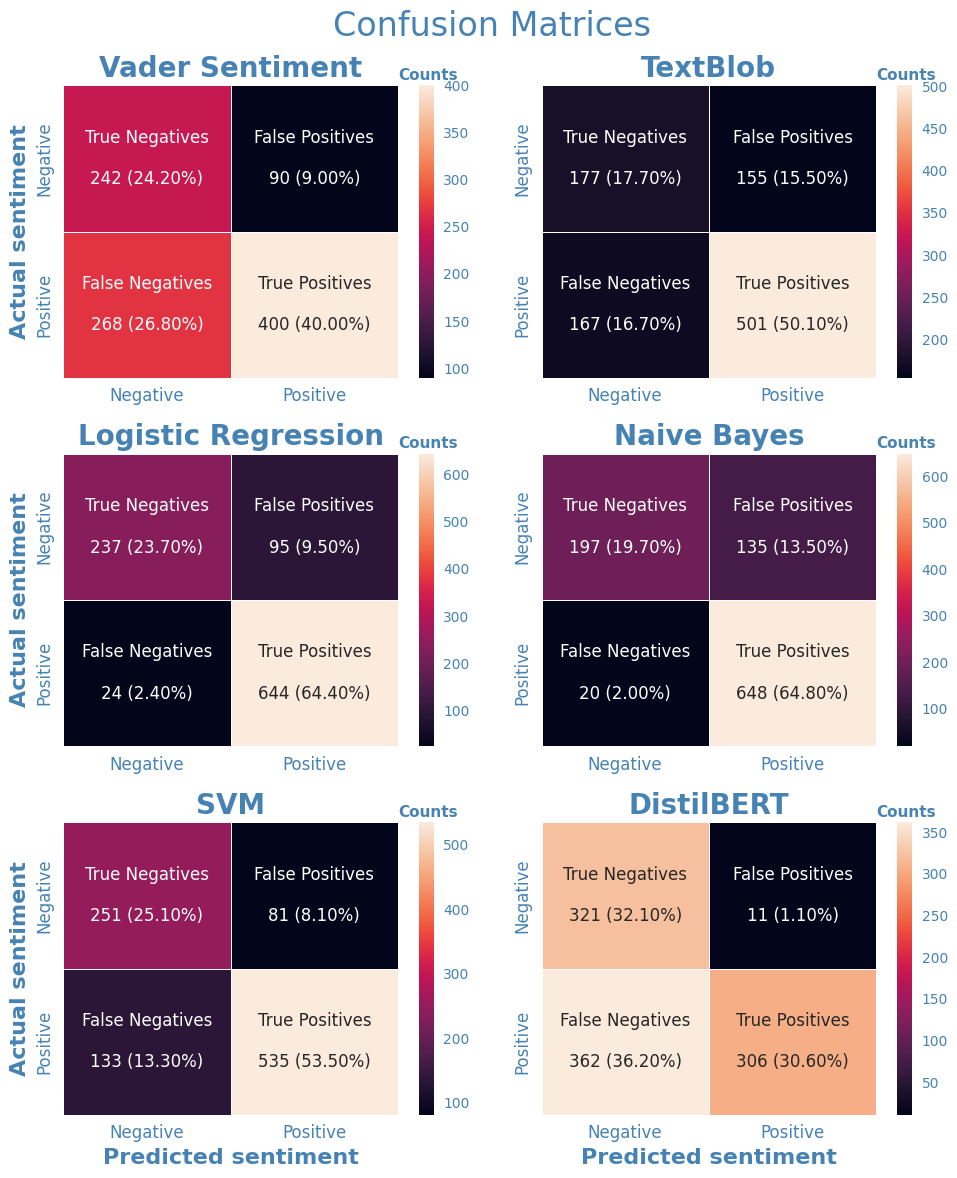
After merging all results, we can have a look at the predictions made by all classifiers.
To make it easier to compare model performance for all classifiers we will create a large image that combines all confusion matrices for the individual classifiers into a single graph.
code
labels = [0, 1]clf_dict = {'vader': 'Vader Sentiment',"textblob": 'TextBlob',"lr": "Logistic Regression",'nb': "Naive Bayes",'svm': "SVM",'fl': 'DistilBERT'}cm_dict = {}for k, v in clf_dict.items(): new = k +"_binlabel" cm_dict[k] = confusion_matrix( results_df["actual_binlabel"], results_df[new], labels=labels )
2023-02-18 18:04:16,731 https://nlp.informatik.hu-berlin.de/resources/models/sentiment-curated-distilbert/sentiment-en-mix-distillbert_4.pt not found in cache, downloading to /tmp/tmpt2_kvm49
Compute performance metrics
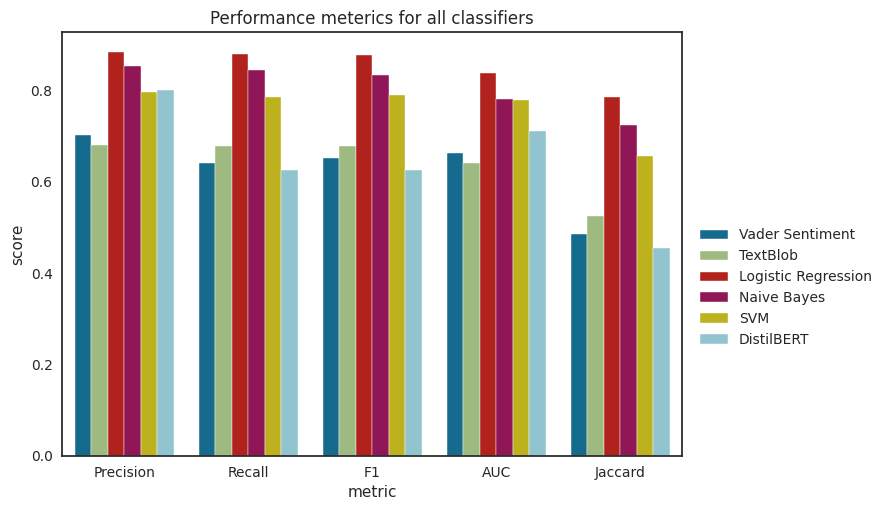
We will also create the following meterics to have a more global view of individual classifier performance:
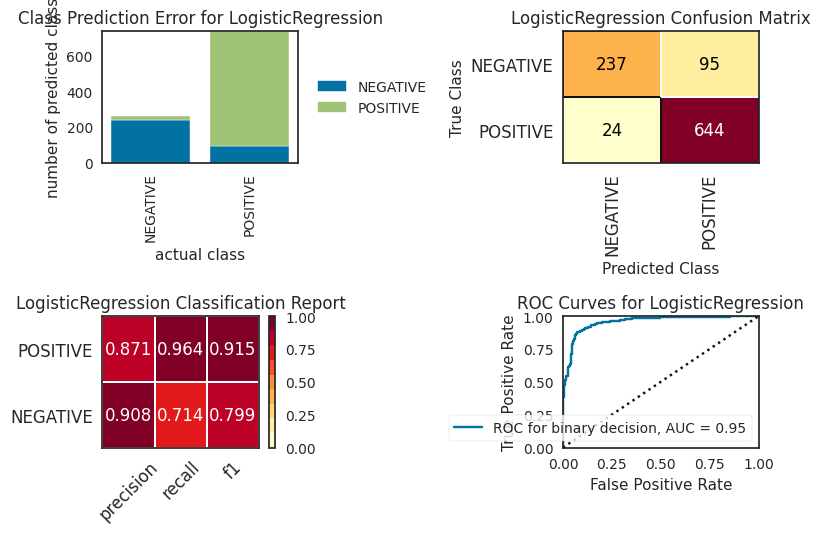
We can observe from the comparison graph that the logistic regression classifier has the best performance across all metrics. Overal feature-based methods seem to have the best out-of-the-box performance, outperforming rule-and embedding-based methods. For the rule-based methods, VADER and Textblob exhibited similar performance. Somewhat surprisingly, the embedding-based model did not outperform the other feature-based classifiers, but exhibited similar performance as the rule-based methods. It should be noted though that we used a sentiment analysis model that was trainined on the IMDB movie reviews data set. So, this data set might not be entirely representative. Becaue we were only interested in out-of-the-box performance for the scopoe of this study, we did not fine-tune the model further. However, it is expected that further finetuning the model on our training set with drug reviews will result in performance gains.
References
Hutto, C., & Gilbert, E. (2014, May). Vader: A parsimonious rule-based model for sentiment analysis of social media text. In Proceedings of the international AAAI conference on web and social media (Vol. 8, No. 1, pp. 216-225).
Loria, S. (2018). textblob Documentation. Release 0.15, 2(8).